
Erstes Beispiel
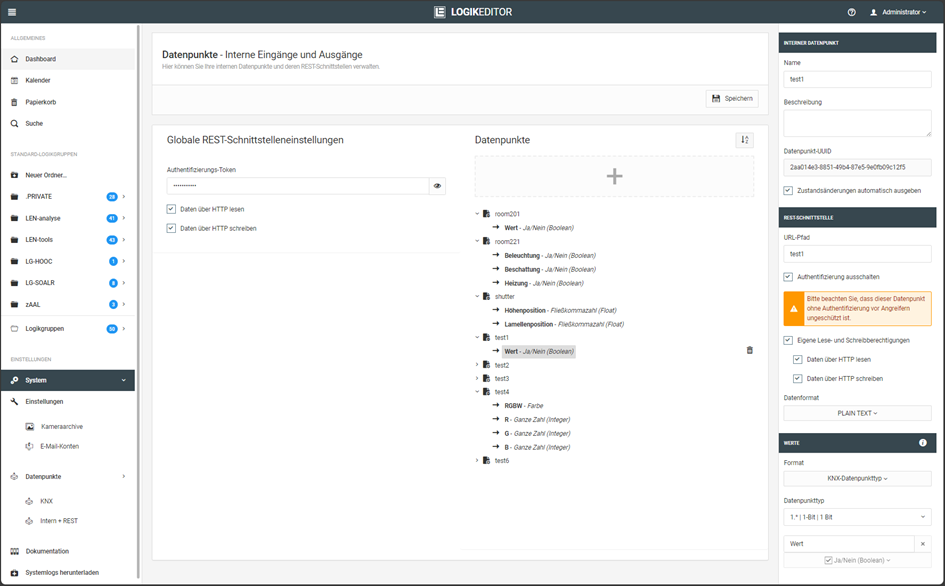
In diesem Beispiel wird über die REST-API ein Schaltbefehl mit dem Wert 1 an einen Datenpunkt gesendet.
-
Schaltbefehl: Wert „1“ senden
-
Protokoll: http
-
Datenformat: PLAIN/TEXT
-
Werteformat: KNX Datenpunkttyp DPT1 (schalten)
-
Authentifizierung: deaktiviert
Befehl mit CURL testen:
curl -vvv -H "Content-Type: text/plain" http://192.168.1.222:81/le/rest/test1 -d "1"
Ausgabe:
janni@bt-laptop2:~$ curl -vvv -H "Content-Type: text/plain" http://172.31.160.145:81/le/rest/test1 -d "1"

Trying 192.168.1.222:81...
Connected to 192.168.1.222 (192.168.1.222) port 81 (#0)
> POST /le/rest/test1 HTTP/1.1
> Host: 192.168.1.222:81
> User-Agent: curl/7.81.0
> Accept: */*
> Content-Type: text/plain
> Content-Length: 1
>

Mark bundle as not supporting multiuse
< HTTP/1.1 200 OK
< content-type: text/plain
< date: Mon, 24 Jun 2024 12:05:53 GMT
< content-length: 1
< access-control-allow-origin: *
< x-xss-protection: 1; mode=block
<

Connection #0 to host 192.168.1.222 left intact
1
Hinweis
Dieses Beispiel verwendet HTTP und überträgt die Daten unverschlüsselt. Verwenden Sie nach Möglichkeit HTTPS.
Zweites Beispiel
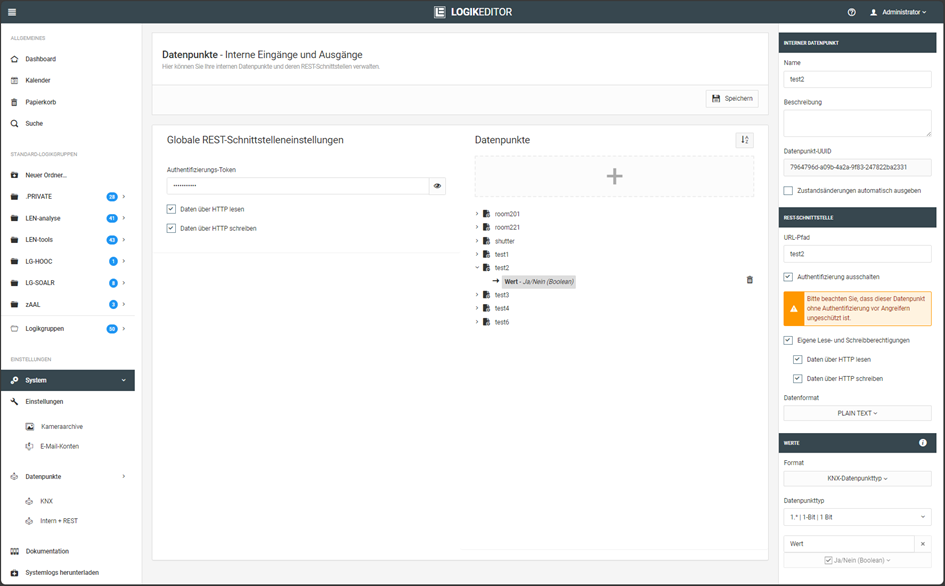
In diesem Beispiel wird der aktuelle Wert eines Datenpunkts über die REST-API abgefragt.
-
Abfrage: Aktueller Status wird abgefragt
-
Protokoll: http
-
Datenformat: PLAIN/TEXT (Antwort wird als Plain Text ausgegeben)
-
Werteformat: KNX Datenpunkttyp DPT1 (schalten)
-
Authentifizierung: deaktiviert
Befehl mit CURL:
curl -vvv http://192.168.1.222:81/le/rest/test2
Ausgabe:
janni@bt-laptop2:~$ curl -vvv http://192.168.1.222:81/le/rest/test2

Trying 192.168.1.222:81...
Connected to 192.168.1.222 (192.168.1.222) port 81 (#0)
> GET /le/rest/test2 HTTP/1.1
> Host: 192.168.1.222:81
> User-Agent: curl/7.81.0
> Accept: */*
>

Mark bundle as not supporting multiuse
< HTTP/1.1 200 OK
< content-length: 5
< content-type: text/plain
< last-modified: Mon, 24 Jun 2024 12:07:21 GMT
< date: Mon, 24 Jun 2024 12:07:22 GMT
< access-control-allow-origin: *
< x-xss-protection: 1; mode=block
<

Connection #0 to host 192.168.1.222 left intact
false
Hinweis
Dieses Beispiel verwendet HTTP und überträgt die Daten unverschlüsselt. Verwenden Sie nach Möglichkeit HTTPS.
Drittes Beispiel
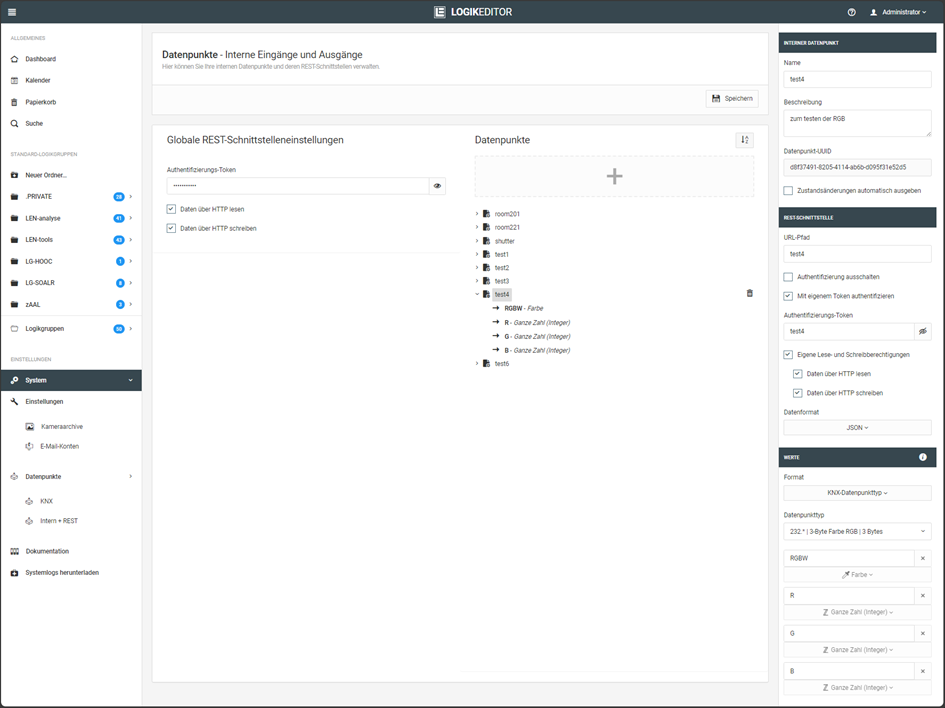
In diesem Beispiel wird ein RGB-Wert im JSON-Format an einen REST-Datenpunkt übertragen.
-
Schaltbefehl: RGB Wert wird gesendet
-
Protokoll: http
-
Datenformat: JSON
-
Werteformat: KNX Datenpunkttyp DPT232 (3x 1Bytewert)
-
Authentifizierung: aktiviert
Befehl mit CURL:
curl -vvv -H "Content-Type: application/json" -H "Authorization: test4" http://192.168.1.222:81/le/rest/test4 -d '{"RGBW":"-4718592","R":"127","G":"127","B":"127"}' (Befehl in eine Zeile)
Der Befehl kann alternativ vollständig in einer Zeile ausgeführt werden.
Ausgabe:
janni@bt-laptop2:~$ curl -vvv -H "Content-Type: application/json" -H "Authorization: test4" -X POST http://192.168.1.222:81/le/rest/test4 -d '{"RGBW":"-4718592","R":"127","G":"127","B":"127"}'

Trying 192.168.1.222:81...
Connected to 192.168.1.222 (192.168.1.222) port 81 (#0)
> POST /le/rest/test4 HTTP/1.1
> Host: 192.168.1.222:81
> User-Agent: curl/7.81.0
> Accept: */*
> Content-Type: application/json
> Authorization: test4
> Content-Length: 49
>

Mark bundle as not supporting multiuse
< HTTP/1.1 200 OK
< content-type: application/json
< date: Mon, 24 Jun 2024 12:16:11 GMT
< content-length: 49
< access-control-allow-origin: *
< x-xss-protection: 1; mode=block
<

Connection #0 to host 192.168.1.222 left intact
{"RGBW":"-4718592","R":"127","G":"127","B":"127"}
Achtung
In diesem Beispiel wird das Authentifizierungstoken über HTTP übertragen. Dadurch werden sowohl das Token als auch die Nutzdaten unverschlüsselt übertragen.
Verwenden Sie für authentifizierte Zugriffe nach Möglichkeit HTTPS.
Viertes Beispiel
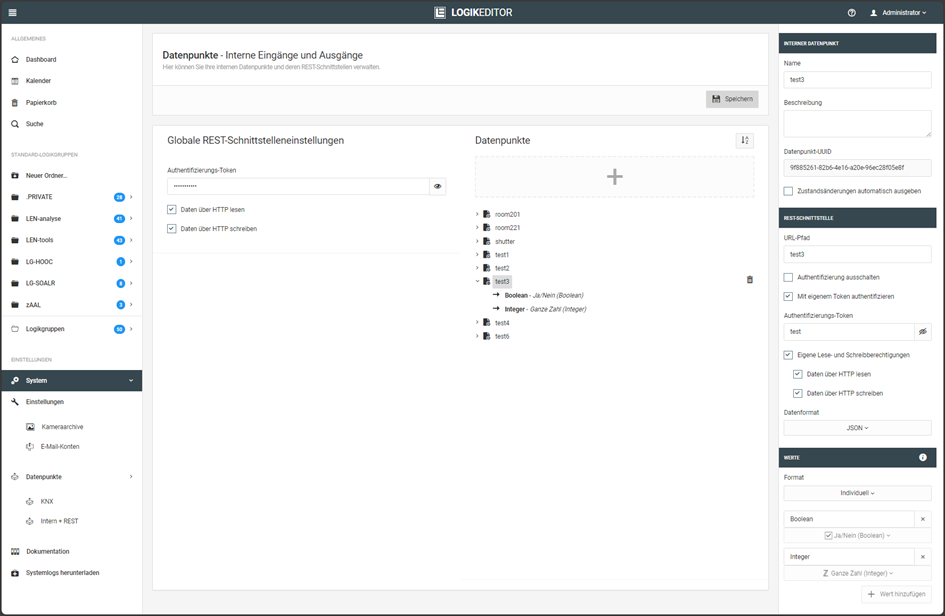
In diesem Beispiel werden zwei individuell definierte Werte in einer einzelnen Anfrage übertragen: ein Boolean-Wert und ein Ganzzahlwert.
-
Schaltbefehl: Bestehend aus 1x Boolean und 1x Ganzzahl Wert
-
Protokoll: https
-
Datenformat: JSON
-
Werteformat: Individuell (bestehen aus zwei Werten; 1x Boolean und 1x Ganzzahl)
-
Authentifizierung: aktiviert
Befehl mit CURL:
curl -k -vvv -H "Content-Type: application/json" -H "Authorization: test" https://192.168.1.222:444/le/rest/test3 -d '{"Boolean":true, "Integer":99}'
Ausgabe:
janni@bt-laptop2:~$ curl -k -vvv -H "Content-Type: application/json" -H "Authorization: test" https://192.168.1.222:444/le/rest/test3 -d '{"Boolean":true, "Integer":99}'

Trying 192.168.1.222:444...
Connected to 192.168.1.222 (192.168.1.222) port 444 (#0)
ALPN, offering h2
ALPN, offering http/1.1
TLSv1.0 (OUT), TLS header, Certificate Status (22):
TLSv1.3 (OUT), TLS handshake, Client hello (1):
TLSv1.2 (IN), TLS header, Certificate Status (22):
TLSv1.3 (IN), TLS handshake, Server hello (2):
TLSv1.2 (IN), TLS header, Finished (20):
TLSv1.2 (IN), TLS header, Supplemental data (23):
TLSv1.3 (IN), TLS handshake, Encrypted Extensions (8):
TLSv1.2 (IN), TLS header, Supplemental data (23):
TLSv1.3 (IN), TLS handshake, Certificate (11):
TLSv1.2 (IN), TLS header, Supplemental data (23):
TLSv1.3 (IN), TLS handshake, CERT verify (15):
TLSv1.2 (IN), TLS header, Supplemental data (23):
TLSv1.3 (IN), TLS handshake, Finished (20):
TLSv1.2 (OUT), TLS header, Finished (20):
TLSv1.3 (OUT), TLS change cipher, Change cipher spec (1):
TLSv1.2 (OUT), TLS header, Supplemental data (23):
TLSv1.3 (OUT), TLS handshake, Finished (20):
SSL connection using TLSv1.3 / TLS_AES_256_GCM_SHA384
ALPN, server did not agree to a protocol

Server certificate:
subject: C=de; DC=de; DC=BAB TECHNOLOGIE; O=BAB TECHNOLOGIE GmbH; CN=epv3.bab-tec.de
start date: Aug 16 08:29:34 2019 GMT
expire date: Aug 13 08:29:34 2029 GMT
issuer: C=de; DC=de; DC=BAB TECHNOLOGIE; O=BAB TECHNOLOGIE GmbH; OU=BAB TECHNOLOGIE Signing CA; CN=BAB TECHNOLOGIE Signing CA

SSL certificate verify result: self-signed certificate in certificate chain (19), continuing anyway.

TLSv1.2 (OUT), TLS header, Supplemental data (23):
> POST /le/rest/test3 HTTP/1.1
> Host: 192.168.1.222:444
> User-Agent: curl/7.81.0
> Accept: */*
> Content-Type: application/json
> Authorization: test
> Content-Length: 30
>

TLSv1.2 (IN), TLS header, Supplemental data (23):
TLSv1.3 (IN), TLS handshake, Newsession Ticket (4):
TLSv1.2 (IN), TLS header, Supplemental data (23):
TLSv1.3 (IN), TLS handshake, Newsession Ticket (4):
old SSL session ID is stale, removing
TLSv1.2 (IN), TLS header, Supplemental data (23):

Mark bundle as not supporting multiuse
< HTTP/1.1 200 OK
< content-type: application/json
< date: Mon, 24 Jun 2024 12:21:16 GMT
< content-length: 30
< access-control-allow-origin: *
< x-xss-protection: 1; mode=block
<

Connection #0 to host 192.168.1.222 left intact
{"Boolean":true, "Integer":99}
Hinweis
Die Option -k weist cURL an, die Zertifikatsprüfung zu überspringen. Sie ist in diesem Beispiel erforderlich, wenn das vom Gerät verwendete Zertifikat vom aufrufenden System nicht als vertrauenswürdig eingestuft wird.
Verwenden Sie -k nur, wenn dies für den jeweiligen Anwendungsfall erforderlich ist.
///